Learning from Production Agent Systems: Claude Code
What studying Claude Code's architecture taught us about building agents in production
We spent time reading the Claude Code documentation[1] and source. This post shares what we found: the architectural decisions behind the agent loop, context management, tool architecture, and sub-agent coordination.
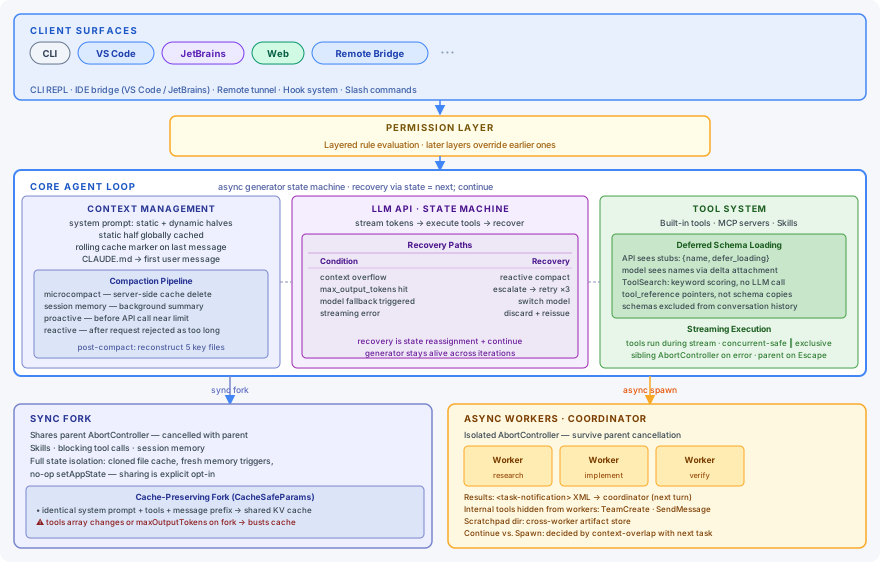
The diagram above shows the architecture as a stack. The sections that follow cover the five areas where the design choices were most instructive to us:
- The agent loop as a recovery machine, not a while loop
- Context treated as a managed resource with lifecycle rules
- Tool schema cost managed explicitly, not by accident
- Sub-agents as context boundaries, not just task specialists
- Multi-agent coordination with enforced role separation
1. The Loop Is a State Machine #
The simplest agent loop is a while loop:
while True:
    response = llm.call(messages)
    if not response.tool_calls:
        break
    messages.append(execute_tools(response.tool_calls))
This works in demos. In production, it meets failures it cannot handle gracefully: context fills mid-turn, the model hits its output token limit and truncates a response mid-tool-call, a streaming error drops part of a message. A while loop with try/except has one response to all of these — unwind the call stack, lose everything accumulated in the current turn, surface an error.
Claude Code's query loop is structured as an async function* — a generator that yields assistant messages to its caller while keeping a mutable state object across iterations:
// src/query.ts
type State = {
  messages: Message[]
  maxOutputTokensRecoveryCount: number  // caps retries at 3
  hasAttemptedReactiveCompact: boolean  // one reactive compact per turn
  turnCount: number
  // ...
}

async function* queryLoop(state: State): AsyncGenerator<AssistantMessage> {
  while (true) {
    // build context, stream from API, execute tools
    // on failure: state = recoveryState; continue
    // on success: yield message; update state
  }
}
The generator pattern matters for two reasons. First, it yields events to the caller — streamed tokens, tool results, status updates — without returning, so the session stays alive across an arbitrary number of API calls. Second, because the State object lives across iterations, a failure mid-turn doesn't unwind anything: recovery is just a state reassignment followed by continue, and the generator picks up from the new state on the next loop iteration:
| Condition | Recovery |
|---|---|
| Context too large mid-turn | Drain stream → reactive compact → rebuild state |
max_output_tokens hit |
Escalate to 64K → inject recovery message → retry |
| Model fallback triggered | Switch model → continue with same turn |
| Streaming error | Discard partial → reissue request |
2. Context Is a Managed Resource #
The agent loop runs inside a context window that behaves like a managed buffer, not an append-only log. Every architectural decision — how the system prompt is structured, where tool schemas live, when to fork a sub-agent — has a cost on this buffer. Understanding that cost is a prerequisite for everything else in this post.
Every API call is built from three top-level parameters, and understanding which content lands in which parameter explains most of the caching architecture:
system: [
  // static half — globally cached; same content for all users
  { text: "CLI personality, guidelines, tool rules...",
    cache_control: { type: "ephemeral", scope: "global" } },

  // dynamic half — session-specific; no cross-session cache in global mode
  { text: "memory files, git status, session guidance..." }
]

tools: [
  { name: "Read", description: "...", input_schema: {...} },  // full schema
  { name: "mcp__gmail__send", defer_loading: true }           // stub — loaded on demand
]

messages: [
  // CLAUDE.md and deferred tool names arrive here, not in system:
  { role: "user", content: "<system-reminder>...</system-reminder>\nuser message" },

  // Tool calls land in assistant turns; results land in the next user turn:
  { role: "assistant", content: [{ type: "tool_use", name: "Read", input: {...} }] },
  { role: "user",      content: [{ type: "tool_result", content: "..." }] },

  // Rolling cache marker is placed on whichever message is last:
  { role: "assistant", content: [{ type: "text", text: "...",
                                   cache_control: { type: "ephemeral" } }] }
]
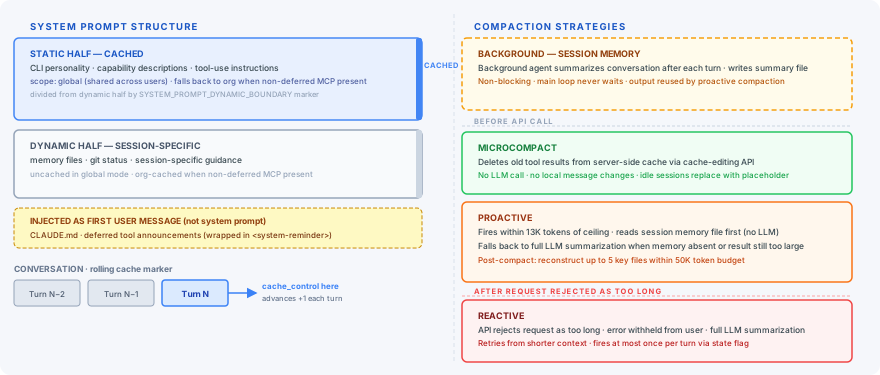
System prompt structure #
A SYSTEM_PROMPT_DYNAMIC_BOUNDARY marker divides the system prompt into two halves:
Static half — CLI personality, capability descriptions, tool-use instructions, coding guidelines. Identical across all users, so it receives a scope: 'global' cache marker and is shared globally across sessions.
Dynamic half — memory files, git status, session-specific guidance, MCP server instructions. Varies per session, computed once at session startup. MCP server instructions are the one exception — they recompute each turn because MCP servers can connect or disconnect mid-session.
Two items that look like system prompt content are not. CLAUDE.md and deferred tool announcements arrive as the first user message, wrapped in a <system-reminder> tag. Tool schemas live in the tools array, not the prompt.
Rolling cache marker #
Prompt caching requires telling the API where the cacheable prefix ends. Claude Code places exactly one cache_control marker per request, on the last message in the conversation. After each turn, that marker advances by one message — the cached prefix grows incrementally with the conversation. By turn 10, the first 9 turns are cached and the cost of re-encoding the full history drops to nearly zero.
Compaction pipeline #
When the context approaches its limit, Claude Code doesn't truncate. Three strategies fire at different moments in the turn lifecycle, supported by a continuously-running background process:
| Strategy | When it runs | LLM call? |
|---|---|---|
| Microcompact | Before every API call | No |
| Session memory | Background, after every turn | Yes (separate cheap agent) |
| Proactive | Before the API call, ~13K tokens from the ceiling | Reuses session memory if present, else full summarization |
| Reactive | After the API rejects the request as too long | Full LLM summarization |
Microcompact uses the API's cache-editing interface to delete old tool results from the server-side cache. The deletion happens entirely at the API layer — local message history is untouched, and the cached prefix isn't busted. A time-based variant fires when the server cache has already expired (idle session): it replaces old tool result content with a placeholder string and resets the cache state.
Session memory runs as a background agent that reads the conversation and writes a structured summary file to disk after every turn. The main loop never waits for it. This isn't a compaction action itself — it's a continuously-updated summary that proactive compaction can reuse.
Proactive compaction is the planned path. Each session has exactly one memory file at a deterministic path keyed to the session's UUID, so proactive reads that file directly — no search, no selection. If the file exists, proactive uses it as the summary and keeps only the recent unsummarized messages, with no new LLM call. If the file is absent or the result would still exceed the threshold, it falls back to a full LLM summarization. After compaction, up to five important files are reconstructed within a 50K token budget.
Reactive compaction is the emergency fallback when proactive miscalculated. The API call goes out, the server rejects it as too long, the error is withheld from the user, reactive runs a full LLM summarization, and the call retries from the new, shorter context. A state flag ensures this fires at most once per turn.
We covered the mechanics of context management in more depth in Context Engineering: Managing the Scarcest Resource in Agent Systems.
3. Tool Architecture: Cost and Execution #
Every tool has a schema. A complex schema is 500–2,000 tokens. At 50 tools, that is up to 100,000 tokens per request — paid on every turn, before any conversation content. On a 200K context window, that's half the budget gone before the user has typed a word, and every additional turn pays the same tax. The schema cost problem is invisible in single-tool demos and significant in production.
Deferred schema loading #
Claude Code splits the representation of a tool across two audiences:
| Audience | What they see |
|---|---|
| API server | {name, defer_loading: true} stub — full schema stripped |
| Model | Tool name only, injected via deferred_tools_delta attachment |
The model learns a tool exists through the delta attachment but never receives the schema upfront. When it needs a tool, it calls ToolSearch with a keyword query. ToolSearch is pure TypeScript — no LLM call, no network round trip. It scores candidates by name match, with MCP tools scoring higher than regular tools because they are explicitly installed by the user.
ToolSearch returns tool_reference pointers, not schema copies. Full schemas are never stored in conversation history. After compaction, deferred tool announcements are reconstructed in the new context so the model doesn't lose track of what's available. Moving tool schemas out of the system prompt into on-demand references saved 10.2% of fleet cache-creation tokens[2].
Skills and MCP: same surface, different execution #
MCP tools and Skills look identical to the model — both are callable tools with names and schemas. Their execution paths diverge completely.
MCP tools are defined by external servers. When the model calls one, Claude Code routes the call to the relevant MCP server process, which executes it and returns a result. The agent loop never sees the implementation.
Skills are reusable agent behaviors defined in markdown files — structured prompts that describe a repeatable workflow, similar to a named system prompt template. When the model calls a Skill, Claude Code spawns a new query loop with the Skill's prompt prepended to the sub-agent's context. The model cannot tell whether it is calling an MCP function or triggering a full agent invocation. The execution path is determined by the tool type, not the model's output.
Concurrent execution and cancellation #
Tools execute during streaming, not after. As the model streams tool calls, StreamingToolExecutor starts running them immediately. Each tool is classified on the way in:
- Concurrent-safe — reads, searches, lookups. Run in parallel with any other concurrent-safe tool currently executing.
- Exclusive-access — writes, mutations. Wait for all running tools to finish before starting, then block new tools until complete.
Results buffer internally and emit in original call order regardless of completion order, so the model always sees a consistent sequence.
Cancellation uses two AbortController instances at different scopes:
- Sibling controller — shared across the tools in a single turn. If one tool errors, it cancels the other in-flight tools but the loop continues processing the turn.
- Parent controller — covers the full turn. The user pressing Escape fires this, propagating cancellation to all children and ending the turn entirely.
The two signals stay independent so a tool failure can never look like a user interrupt.
4. Sub-Agents as Context Boundaries #
Sub-agents are usually framed as task specialists — research agent, implementation agent, verifier. That framing is accurate but incomplete. Their more fundamental role is keeping expensive work out of the parent's context.
Consider what happens without isolation. A sub-agent researching the codebase reads 20 files, hits 5 permission errors, retries with adjusted paths, and eventually produces a 3-paragraph summary. Every tool call, every error, every intermediate result enters the parent's context. The parent grows in proportion to the volume of work the sub-agent did — not the value of what it returned.
With isolation, the parent receives only the conclusion. The sub-agent's working context — its reads, errors, retries — stays bounded and is discarded when it finishes. The parent's context now grows with the number of conclusions, not the work that produced them. Manus's co-founder describes the same principle in their context engineering writeup: pass the result, not the workspace[3].
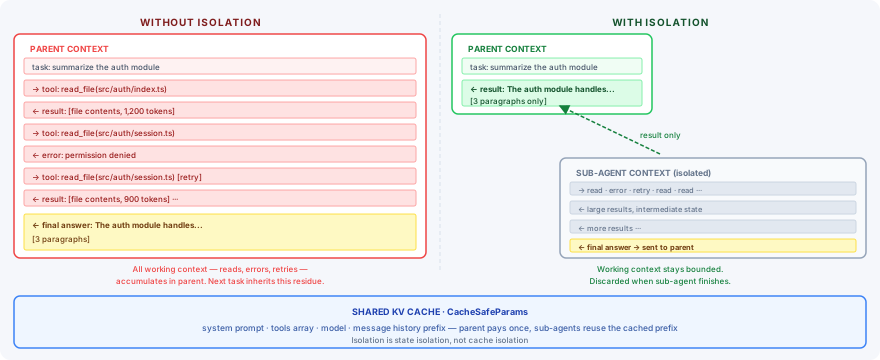
Claude Code implements full isolation as the default in createSubagentContext:
// src/utils/forkedAgent.ts
export function createSubagentContext(parentContext, overrides?) {
  return {
    readFileState: cloneFileStateCache(parentContext.readFileState), // cloned, not shared
    nestedMemoryAttachmentTriggers: new Set<string>(),              // fresh — no parent triggers
    abortController: createChildAbortController(parentContext.abortController),
    getAppState: () => ({
      ...state,
      toolPermissionContext: {
        ...state.toolPermissionContext,
        shouldAvoidPermissionPrompts: true,  // sub-agents never prompt the user
      }
    }),
    setAppState: () => {},      // no-op — sub-agent cannot write back to parent store
    ...
  }
}
Each isolation is intentional: cloned file state so the sub-agent's reads don't pollute the parent's cache, fresh memory triggers so reads don't cascade, a no-op setAppState so writes can't escape. Sharing is an explicit opt-in via override flags, not a default.
Cache-preserving forks #
Full isolation would be expensive if every sub-agent had to re-encode the parent's KV cache from scratch. Claude Code propagates CacheSafeParams — the five parameters that form the API cache key — so a fork can present the same values and reuse the parent's cached prefix for free:
// src/utils/forkedAgent.ts
export type CacheSafeParams = {
  systemPrompt: SystemPrompt           // same system prompt content
  userContext: { [k: string]: string } // same CLAUDE.md and memory files
  systemContext: { [k: string]: string } // same git status and env state
  toolUseContext: ToolUseContext        // same tools array and model
  forkContextMessages: Message[]       // parent's message history up to fork point
}
Cache keys include more than they look like they do. Two parameters that feel like fork-time customizations are actually in Claude Code's key: the tools array (must match the parent's exactly) and maxOutputTokens (must not be set on the fork at all). Either one set differently from the parent silently negates the cache reuse the fork was designed to preserve — the savings don't fail loudly, they just stop happening. The pattern generalizes: any time you build a fork-and-customize mechanism, the first question is which of the customizations land in the cache key.
Async vs. sync lifecycle #
The async/sync distinction maps directly onto cancellation semantics. Sync forks — Skills, blocking tool calls, session memory — share the parent's AbortController and cancel with the parent when the user interrupts. Async workers — background research, coordinator workers — get an isolated controller and survive parent cancellation. Their results arrive as <task-notification> messages in the next turn.
The user who presses Escape doesn't lose an async worker's work. When their next message arrives, the completed notification is included in context and the coordinator can act on it.
5. Coordination Protocol #
Sub-agent isolation gives each worker a clean context to operate in. As soon as more than one of them is working on the same problem, you need rules for how they fit together — what each role owns, how results flow back, where they share state. Claude Code's coordinator mode answers all three with explicit role separation enforced at the tooling layer.
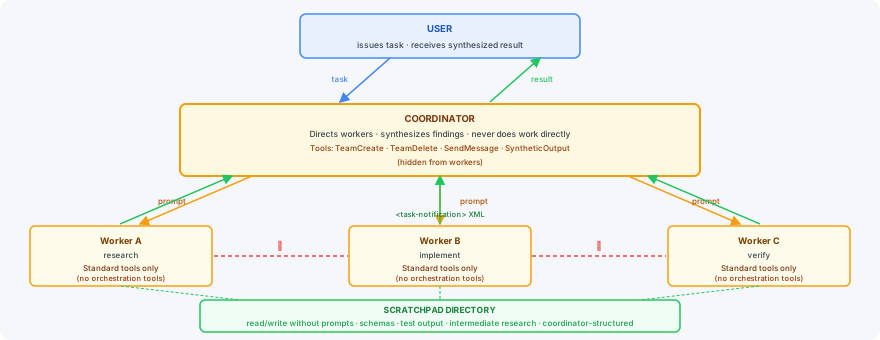
Roles #
The coordinator's job is not to do work. It directs workers, synthesizes findings, and communicates with the user. Workers execute autonomously: research, implementation, verification.
The coordinator never hands off understanding. It reads each worker's findings, identifies the approach, and writes follow-up prompts with specific file paths, line numbers, and exact changes required. A prompt like "based on your findings, implement the fix" delegates a responsibility that only an agent with the full context can discharge — and the coordinator is the only agent that has it.
Role separation is enforced at the tooling layer, not the prompt layer. Internal orchestration tools — TeamCreate, TeamDelete, SendMessage, SyntheticOutput — are excluded from worker tool listings. Workers cannot see or invoke them. Prompt-level instructions to "not use" a tool are unreliable; removing the tool from the listing is not.
Message protocol #
Results from workers arrive as structured <task-notification> XML blocks in user-role messages:
<task-notification>
  <task-id>agent-a1b</task-id>
  <status>completed</status>
  <result>Found null pointer in src/auth/validate.ts:42. The user field on
  Session is undefined when the session expires but the token stays cached.</result>
</task-notification>
Workers never communicate with each other. All results flow to the coordinator, which decides what to do next. Single-direction routing eliminates the distributed coordination failures that come from peer-to-peer agent communication — no worker needs to track another worker's state.
Scratchpad #
Workers often produce intermediate artifacts that other workers need: partial file schemas, discovered type signatures, test output that a verifier must check, research notes that inform an implementation. Direct message passing between workers would create coordination state the coordinator can't observe. Instead, the system maintains a scratchpad directory that all workers can read and write without permission prompts.
The coordinator structures it — typically one subdirectory per worker or per task phase — and injects relevant paths into each worker's prompt. Workers write their output; subsequent workers or the coordinator read it when needed. The scratchpad is the only cross-worker knowledge store, and it is deliberately not a message channel.
Continue vs. spawn #
After a worker finishes, the coordinator decides whether to continue it with follow-up instructions or spawn a fresh worker with a synthesized prompt. The principle is simple: context that helps with the next task is a feature; context that just adds noise is a bug. The decision turns on which one the worker's accumulated context is:
| Situation | Mechanism | Why |
|---|---|---|
| Research explored exactly the files that need editing | Continue | Worker already has those files in context |
| Research was broad, implementation is narrow | Spawn fresh | Exploration noise pollutes a focused task |
| Correcting a worker's own failure | Continue | Worker has the error context it just produced |
| Verifying a different worker's output | Spawn fresh | Verifier should read the code with fresh eyes |
| Wrong approach entirely | Spawn fresh | Failed-approach context anchors the retry |
Key Takeaways #
Each of the five areas reflects a decision that looks small in isolation but compounds across a long-running agent session.
- The loop — not a while loop, a recovery state machine where failures are state transitions that keep the generator alive
- Context — not a prompt, a system prompt split at a dynamic boundary into cached and uncached halves, with a rolling cache marker and three compaction strategies that fire before and after the API call
- Tools — not a static list, a cost center with deferred schemas, keyword-scored on-demand discovery, and concurrent streaming execution
- Sub-agents — not task specialists, context boundaries with full isolation by default and cache-preserving forks via CacheSafeParams
- Coordination — not spawning, a protocol with tool-enforced role separation, single-direction routing, and synthesis responsibility that cannot be delegated
The cross-cutting constraint behind every decision is the same: any change to the cached prefix — tool list, system prompt content, thinking configuration — invalidates the KV cache for everything that follows. Every architectural choice above is shaped, in part, by the need to keep that prefix stable. That constraint, more than any other, is what production agent architecture is optimizing around.
References #
Citation #
If you found this useful, please cite this blog as:
Non-linear AI. (Apr 2026). Learning from Production Agent Systems: Claude Code. non-linear.ai. https://non-linear.ai/blog/multi-agent-systems/
or
@article{ai2026multiagentsystems,
  title   = {Learning from Production Agent Systems: Claude Code},
  author  = {{Non-linear AI}},
  journal = {non-linear.ai},
  year    = {2026},
  month   = {Apr},
  url     = {https://non-linear.ai/blog/multi-agent-systems/}
}